
Event Phases
Your dashboard shouldn’t look the same 6 months before the event and 2 weeks before. The phase system automatically detects where you are in the planning journey and shows you exactly what matters right now.
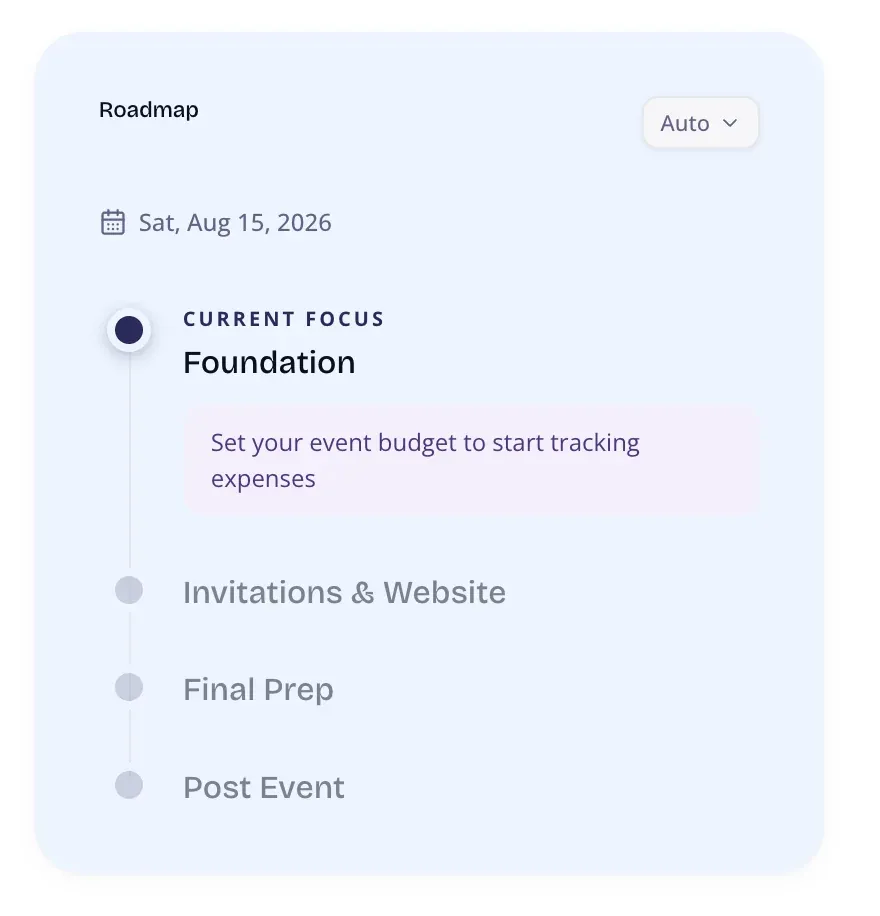
Phases
Section titled “Phases”| Phase | When | Focus |
|---|---|---|
| Foundation | 90+ days before event | Budget, vendors, guest list |
| Invitations & Website | 30-90 days before | Website, invitations, RSVPs |
| Final Prep | 0-30 days before | Seating, confirmations, last details |
| Post-Event | After the event date | Photos, thank-you notes, memories |
Phase Detection
Section titled “Phase Detection”The current phase is computed automatically from your event date:
- No date set defaults to Foundation
- 90+ days out = Foundation
- 30-90 days = Invitations & Website
- Under 30 days = Final Prep
- Past event date = Post-Event
Dashboard Components
Section titled “Dashboard Components”Phase Hero
Section titled “Phase Hero”A banner at the top of the dashboard showing the current phase name, a progress bar, and up to 3 smart nudges. Nudges are contextual — “Set your budget” only appears in Foundation if no budget exists yet.
Phase Action Cards
Section titled “Phase Action Cards”Phase-relevant cards with stats, progress bars, and CTAs. Each phase surfaces different features:
- Foundation: Budget, Vendors, Guest List, Vision Board
- Invitations: Website, Messages, RSVPs, Seating
- Final Prep: Seating, Checklist, Confirmations, Day-of Details
- Post-Event: Photos, Albums, Thank-You Notes, Memories
Progress Map
Section titled “Progress Map”A compact overview showing all 4 phases with progress bars and completion stats. The current phase is highlighted. Click any phase to see its details.
Advance Nudge
Section titled “Advance Nudge”When you’re mostly done with a phase, a nudge suggests moving to the next one. It also lists blocking tasks to wrap up first (e.g., “Approve Budget”, “Finalize Vendor List”).
Per-Event-Type Config
Section titled “Per-Event-Type Config”Each event type (wedding, corporate, birthday, etc.) has its own phase configuration. For example, “catering” tasks appear in Foundation for weddings but may appear in a different phase for corporate events.